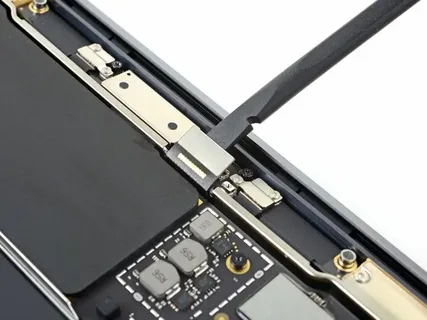

Your MacBook is designed for performance, portability, and reliability. But over time, one component that naturally degrades is the battery. Whether you own a MacBook Air or MacBook Pro, battery health directly affects performance, usability, and even safety. Recognizing early warning signs can help you act quickly and avoid bigger problems.
In this guide, we’ll explore the key indicators that signal the need for a MacBook air pro battery replacement, the reasons behind battery wear, and when to consider professional MacBook repair services instead of delaying the issue.
Why MacBook Batteries Wear Out
MacBook batteries are lithium-ion based, meaning they have a limited number of charge cycles. Typically, Apple designs batteries to retain up to 80% of their capacity after around 1000 charge cycles. However, real-world usage, heat, and charging habits can accelerate battery degradation.
Common factors that impact battery life include:
- Frequent full charge and discharge cycles
- Exposure to high temperatures
- Using non-certified chargers
- Running heavy applications continuously
- Aging over time
Eventually, every device reaches a point where MacBook battery replacement becomes necessary.
Key Warning Indicators You Should Not Ignore
- Rapid Battery Drain
If your MacBook battery drops quickly even with minimal usage, it’s a strong sign of degradation. Tasks that once lasted hours may now drain your battery within minutes.
This is often the first indicator that you may need a MacBook air pro battery replacement.
- Unexpected Shutdowns
Does your MacBook suddenly shut down even when the battery shows 20–30% remaining? This happens when the battery can no longer maintain stable voltage.
Ignoring this issue can lead to data loss and workflow interruptions, making MacBook repair services essential at this stage.
- Battery Not Charging Properly
If your MacBook:
- Charges very slowly
- Gets stuck at a certain percentage
- Doesn’t charge at all
Then the battery or charging system may be failing. While sometimes it’s a charger issue, persistent problems usually point toward MacBook battery replacement.
- Swollen Battery
A swollen battery is a serious warning sign. You might notice:
- A bulging keyboard
- Trackpad not clicking properly
- Uneven surface
This is not just a performance issue—it’s a safety concern. Immediate MacBook air pro battery replacement is required to avoid further damage.
- Overheating Issues
If your MacBook heats up quickly during normal use, the battery could be struggling internally. A failing battery often generates excess heat, which can affect internal components.
In such cases, timely MacBook repair services can prevent long-term hardware damage.
- System Warning Messages
macOS may display alerts like:
- “Service Battery”
- “Replace Soon”
- “Battery Not Charging”
These are built-in indicators that your system has detected battery health issues. Ignoring these alerts can lead to worsening performance and eventual failure.
- Reduced Performance
Apple systems sometimes reduce performance to prevent shutdowns when the battery is degraded. If your MacBook feels slower than usual, the battery might be the hidden reason.
A proper MacBook battery replacement can restore both speed and efficiency.
- Short Battery Lifespan After Full Charge
If your MacBook shows 100% but lasts only a short time unplugged, the battery capacity has significantly reduced.
This is one of the clearest signs that a MacBook air pro battery replacement is overdue.
Risks of Ignoring Battery Problems
Delaying battery replacement can lead to more than just inconvenience. Here are some risks:
- Damage to internal components
- Increased overheating
- Data loss due to sudden shutdowns
- Physical damage from battery swelling
- Reduced device lifespan
Addressing issues early with professional MacBook repair services ensures your device stays safe and functional.
When to Choose Professional MacBook Repair Services
While some users consider DIY solutions, MacBook batteries are not easily replaceable, especially in newer models. They are glued and integrated into the device.
You should opt for professional MacBook repair services when:
- The battery is swollen
- The device doesn’t power on
- You lack proper tools or experience
- You want to avoid damaging internal components
Professional technicians ensure proper installation, safe disposal of old batteries, and testing after replacement.
Benefits of Timely MacBook Battery Replacement
Replacing your battery at the right time offers several advantages:
Improved Performance
A new battery allows your MacBook to run at optimal speed without throttling.
Longer Usage Time
You regain the ability to use your device unplugged for extended periods.
Enhanced Safety
Eliminates risks like overheating or swelling.
Better Productivity
No more interruptions due to sudden shutdowns or charging issues.
A timely MacBook battery replacement helps maintain the overall health of your device.
Tips to Extend Battery Life
Even after replacement, proper care can extend battery lifespan:
- Avoid extreme temperatures
- Use original or certified chargers
- Don’t keep your MacBook plugged in all the time
- Maintain charge between 20%–80% when possible
- Close unused applications
These habits reduce the need for frequent MacBook air pro battery replacement.
How Often Should You Replace a MacBook Battery?
On average, a MacBook battery lasts 3–5 years depending on usage. Heavy users may notice degradation sooner, while light users might extend battery life longer.
Monitoring battery health regularly helps you plan for MacBook battery replacement before problems become critical.
Conclusion
Your MacBook’s battery plays a crucial role in performance and usability. Ignoring early warning signs can lead to serious issues, from reduced efficiency to hardware damage.
If you notice symptoms like rapid battery drain, unexpected shutdowns, overheating, or swelling, it’s time to consider a MacBook air pro battery replacement. Choosing professional MacBook repair services ensures the job is done safely and effectively.
By staying proactive and addressing battery issues early, you can extend the life of your MacBook and enjoy smooth, uninterrupted performance.