A well-functioning battery is one of the most important components of any laptop, especially for those who rely on consistent speed and mobility. Over time, even the best devices begin to show signs of battery wear—slower performance, reduced battery life, overheating, or unexpected shutdowns. If you’ve noticed these issues, a MacBook battery replacement may be the quickest and most effective way to restore your device’s speed and reliability.
This comprehensive guide will help you understand when to replace your battery, the benefits of doing so, and how a fresh battery can give your device a significant performance boost. We’ll also highlight how battery repair needs vary between different devices, such as Surface Pro 4 battery replacement, and important considerations for users seeking battery repair Dubai services.
Why Battery Health Matters for MacBook Performance
Battery performance directly affects how well your MacBook functions. When a battery deteriorates, the device compensates by reducing power output, limiting processor speed, and altering system behavior to conserve energy. These adjustments can create noticeable slowdowns in day-to-day tasks.
A worn-out battery can also cause:
- Lag during multitasking
- Reduced screen brightness
- Frequent overheating
- Sudden shutdowns
- Longer app loading times
Choosing a MacBook battery replacement not only resolves these issues but can also restore your device to near-original performance, ensuring smooth operation for years to come.
Common Signs You Need a MacBook Battery Replacement
Understanding the signs of battery wear helps prevent serious performance issues. Here are the most common indicators that your battery may need replacement:
- Rapid Battery Drain
If your MacBook battery drops quickly even when running light apps, it’s a strong signal that the battery has degraded.
- Slow Performance
macOS automatically reduces CPU speed when battery health declines. This results in sluggish app performance and longer processing times.
- Overheating
A damaged battery generates excess heat, which affects internal components and overall system stability.
- Swollen Battery
A swelling battery is a serious warning sign and requires immediate attention. It can push against internal parts and damage the trackpad or keyboard.
- Low Maximum Capacity
When the battery capacity reduces significantly below 80%, a MacBook battery replacement becomes the best long-term solution.
How a New Battery Improves Speed and Efficiency
After replacing the battery, users commonly report:
- Faster Boot Times
A healthy battery allows the MacBook to allocate proper power to all components, resulting in quicker startup.
- Stable Performance Under Load
Multitasking becomes smoother because the processor no longer operates under restricted power conditions.
- Longer Battery Life
Instead of constantly looking for a charger, you can work longer hours without interruptions.
- Cooler Device Temperature
New batteries regulate power more efficiently, reducing internal heat and extending the device’s lifespan.
- Improved Power Management
macOS optimizes performance much more effectively when paired with a high-quality replacement battery.
Replacing your battery is one of the most cost-effective ways to make your MacBook feel faster and more responsive.
MacBook Battery Replacement Process Explained
If you’re planning a battery replacement, understanding the process helps you make informed decisions. Here’s a simple breakdown:
Step 1: Diagnose Battery Health
Before replacing the battery, check its current condition via macOS settings. If the system indicates “Service Recommended,” it’s time to consider a replacement.
Step 2: Backup Your Data
Although battery replacement is generally safe, backing up your device protects your files from unexpected interruptions.
Step 3: Choose the Right Replacement Battery
Selecting a high-quality battery ensures proper performance and safety.
Step 4: Replace the Battery
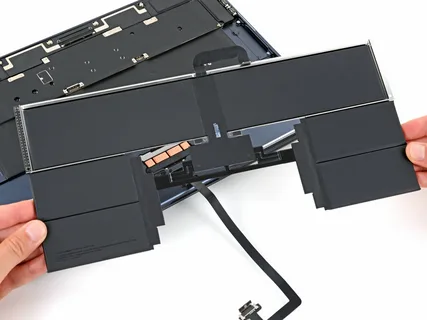
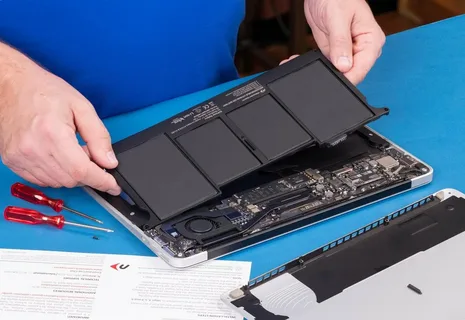
This step involves carefully removing the old battery and installing the new one. Depending on the model, adhesive, cable connectors, or screws may need special handling.
Step 5: Calibrate the Battery
After installation, cycling the battery from 100% to 0% helps macOS recognize the new battery for accurate power readings.
Comparing with Other Devices: Surface Pro 4 Battery Replacement
Battery management varies across different devices, and many users compare the MacBook with other popular models like the Surface Pro. For example, a Surface Pro 4 battery replacement comes with its own challenges due to the tablet-like design and tight internal structure.
Here’s how a Surface Pro 4 replacement differs:
- More delicate disassembly due to the display adhesive
- Higher risk of screen damage during opening
- Compact layout makes internal components harder to access
- Longer repair time compared to many laptop models
While both devices benefit greatly from battery replacement, the process itself is often easier on MacBooks due to their more repair-friendly design. Understanding these differences helps users appreciate how essential proper servicing is for all portable devices.
Important Tips When Seeking Battery Repair Dubai Services
For users searching for battery repair Dubai, it’s crucial to choose reliable professionals who understand the complexity of modern electronics. Dubai’s growing tech repair market offers many options, but quality varies. Keep these tips in mind:
- Check Technician Experience
Look for services with specialists familiar with MacBook and Surface Pro models.
- Ask About Battery Quality
Always confirm that the replacement battery matches original specifications.
- Verify Warranty Options
A good repair service should offer a warranty on both labor and battery performance.
- Ensure Proper Diagnostics
A complete diagnosis helps rule out other issues such as motherboard, trackpad, or charging port faults.
- Check Customer Reviews
Feedback from other customers provides insight into service quality and reliability.
Choosing the right professional service ensures a long-lasting and safe battery replacement.
Maintenance Tips to Extend New Battery Lifespan
After your MacBook battery replacement, following simple habits can keep your new battery healthy:
- Avoid charging to 100% constantly
- Prevent the battery from dropping below 20%
- Keep your MacBook away from extreme heat
- Avoid running heavy apps while charging
- Reduce screen brightness for better battery life
These daily practices help maximize efficiency and ensure your battery stays strong for several years.
Why Battery Replacement Is a Smart Investment
A battery replacement is one of the most effective ways to boost your MacBook’s lifespan and performance without investing in an entirely new device. For users who travel often, edit videos, run heavy software, or multitask daily, a healthy battery ensures the device performs smoothly and reliably.
Whether you’re considering a MacBook battery replacement, exploring a Surface Pro 4 battery replacement, or searching for trusted battery repair Dubai services, taking action at the right time prevents performance issues from escalating and restores your device to optimal condition.
A new battery doesn’t just extend usage time—it brings back the speed, stability, and efficiency your device had when it was new. If your MacBook has been slowing down or draining quickly, a replacement may be the perfect solution to maximize performance and productivity.